
Obsolete SMB1 Protocol Enablement Still Used to fix Undetectable NAS Drives Even with Windows 11
BRASELTON, Georgia (Nov. 16, 2024) — For more than a decade, the issue of Windows not able to detect Network Attached Storage (NAS) drives on a simple home network has been a problem. Even now, Windows 11 still can’t get it right. Generally occurring after a fresh install or activation of a new system.
The fix to this problem has been used for decades. It involves enabling Windows 11 Server Message Block (SMB) SMB1 protocol. The fix, also, was or may still be hard to find. Especially when one doesn’t know where to look.
In this regard, this article celebrates the fix and includes links to the articles discussing them in more detail.
As far back as 2012 Windows, typically upon a fresh install or on a newly activated computer, was unable to detect NAS drives connected to a network attached to a home router’s USB port.
Since the user’s NAS drives were gainfully detected prior to the new install or activation of Windows, this eliminated consideration that the problem lied with he router or NAS system used. Putting the target on the back of Windows. What did it do configuration wise to create this unsuspecting problem.
So, instead of enjoying the new install or computer, the user spends hours troubleshooting the problem. While tinkering with firewall configuration changes seeking a solution.
If lucky, the user discovers an obscure article discussing the fix which involves enabling obsolete Server Message Block (SMB) SMB1 network communications protocol inside windows.
At some point, SMB1 apparently had security issues, and was disabled in windows. On top of it all, SMB1 has been revised over the years to version SMB2, and SMB3.
Nonetheless, this writer ran into the same problem as more than ten (10) years ago after activating and setting up Windows 11 Home on a new system.
It is important to note, that all aspects of hardware used (router, drives, and new computer) are all 2024 editions and equipment. So its a shame to have to invoke the imperfect, but effective solution of enabling an obsolete SMB1 protocol.
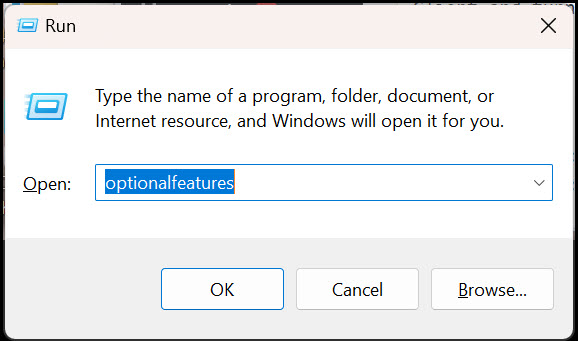
The fix is quick and easy. Simply invoke the run command prompt (Windows Key + R) and type: optionalfeatures.
Image 1
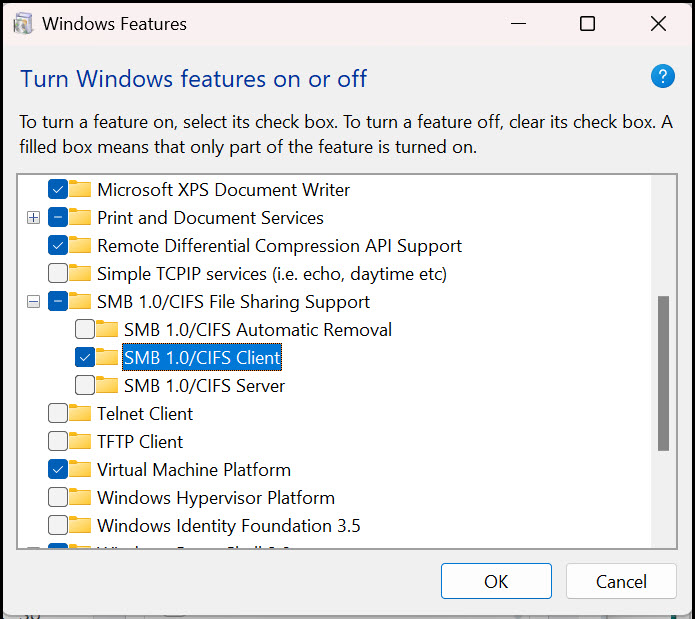
Then scroll down to SMB 1.0/CIFS Automatic Removal, SMBV 1.0/CI/FS Client and turn it on by ticking the box.
Image 2
In this regard, and since the problem still lingers as late as Windows 11, included in this article are links discussing the fix and SMB1 protocol generally.
The first, is by Paul Murana (“How to enable SMB1 on Windows 10”, September 25, 2019 at https://tachytelic.net/2019/09/windows-10-enable-smb1/) which discusses the fix I’ve used over the years.
Second, is a link to a discussion on the topic on Microsoft’s help forum: (“How to detect, enable and disable SMBv1, SMBv2, and SMBv3 in Windows” May 18, 2023 at https://learn.microsoft.com/en-us/windows-server/storage/file-server/troubleshoot/detect-enable-and-disable-smbv1-v2-v3?tabs=server).
These links, along with this post rehashing the matter, hopefully spreads the word on the issue regarding Windows 11’s, and previous versions, inability to accessible NAS drives connected to a router on a simple home network.
================
Links:
How to enable SMB1 on Windows 10
How to detect, enable and disable SMBv1, SMBv2, and SMBv3 in Windows
Leave a Reply